kotlin
The app that started as a markdown file
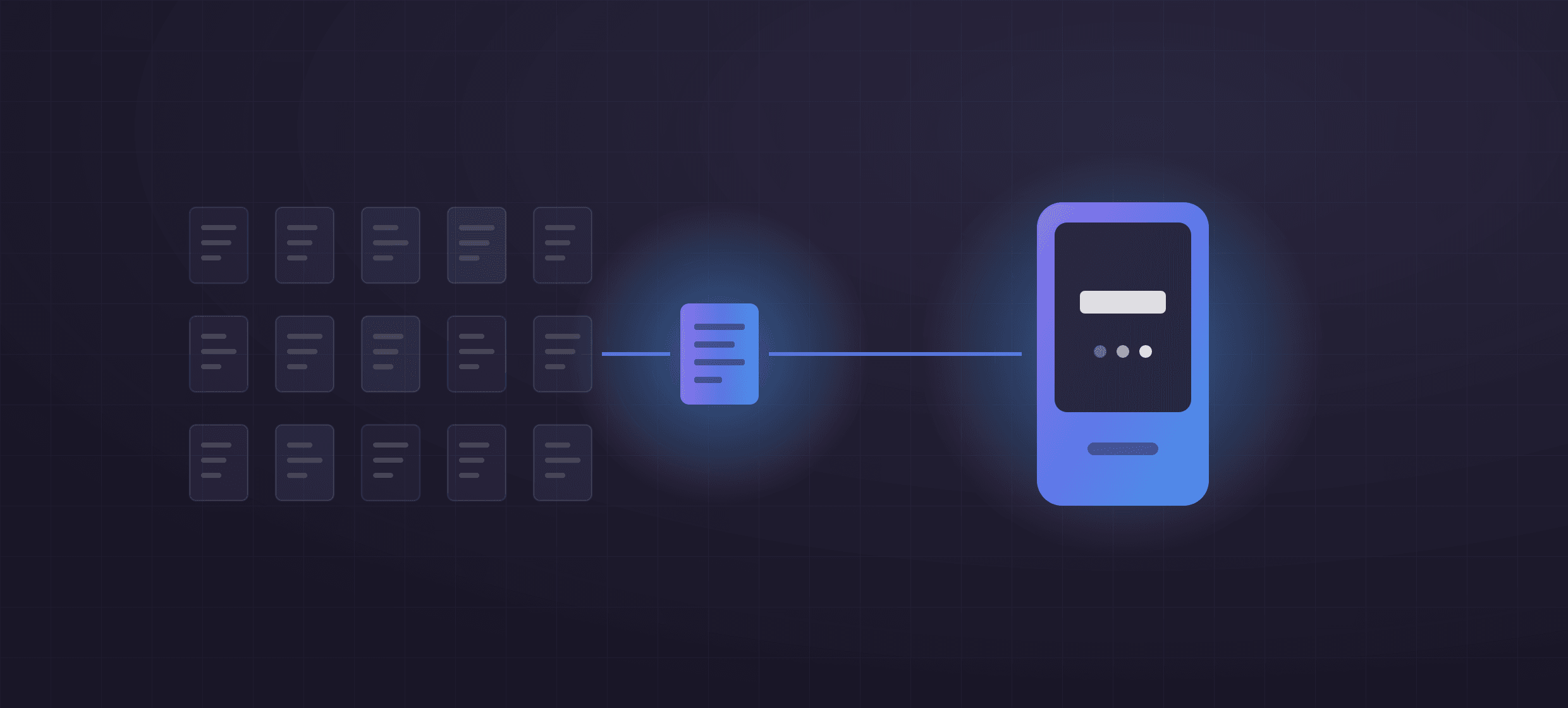

On Thursday I sent our terminal app, 1club Bridge, to Datecs. They sign it with their own key, send it back so we can check it on a terminal, and then publish it in the DatecsStore, where a club with a BlueCash on the counter can install it. The version they'll publish is 1.0.0. A few weeks ago the repository was empty.
I've written about this app twice already. Unknown is not a decline was the design for the money, the rules about when the bridge may touch a card and what it may claim afterwards. Four roles, one feature was about building fiscal receipts as product owner, domain expert, architect and engineer at the same time. Neither one says much about the app itself. How it started, why it's Kotlin, how the repository is put together and what it took to get a payment app into a terminal vendor's store, so that's this post.
What the app had to cover
The bridge is small, and it still touches more layers than most features I've built:
- Product: a terminal that sits on a reception desk all day, has to be ready when a sale comes in, and is looked at by customers as well as staff.
- Hardware: two Datecs devices on my desk. A BlueCash-50MX, an Android terminal with a card reader and a fiscal module built in, and a BluePad-50 Plus, a pinpad on a USB cable.
- System design: a contract with 1club, a command queue on the server, and nothing on the device that has to survive a reinstall.
- Build: one codebase for an Android app now and a desktop app later.
- Distribution: a certified payment terminal gets its apps from the vendor's store, after the vendor has checked and signed them.
Documents first
The first day on the repository produced documents and no code at all. That was on purpose. A design document is cheap to change. A decision that's already on twenty terminals costs a release to change and, depending on the decision, a data migration on each of them.
The design I started with was a different app from the one that shipped. The README described a service on the reception computer (Windows, macOS or Linux) that drove a BluePad through the DatecsPay Java SDK over USB, serial or Bluetooth. Every result was to be written to a local SQLite journal before it was sent to 1club, "so a charged card is never lost to a network drop or a restart".
Before the day was out it changed four times:
- The design went vendor-neutral, with Datecs as the first integration behind a driver interface.
- The scope shrank to two jobs, take a card payment and print its fiscal receipt. No refunds, no voids, no tips.
- The journal went, and the BlueCash Android app went in. The first design post explains the reasoning, but the short version is that every question the journal would answer already has an owner that knows better (1club, the terminal's log or the fiscal module's memory).
- The card started waiting for 1club to acknowledge
acceptedbefore an amount goes on the screen, and a charge and its receipt became two outcomes that settle separately.
By the end of it the reception computer was the second app and the BlueCash the first, and there was no database anywhere on site. Each of those changes was a rewrite of a markdown file. If the journal had been built first, step 3 would have meant deleting working code and its tests, and I'm not sure I'd have done it.
A few days later, with both terminals on my desk, I opened a session with "I have the physical pos terminals ... let's start planning the
implementation for both - android app and desktop", and the plan came back in
milestones, M0 to M7. M0 wasn't code either. It was a bench guide for each
device: developer mode and adb on the BlueCash, Datecs' own demo app, a 0.01
purchase, a probe of how long a reference can be, and a list of questions to
send Datecs before any receipt was printed. Only after that did the
repository get its first build.gradle.kts.
Picking the language
The language came from the hardware. Datecs ships the DatecsPay SDK as a Java jar and as a .NET library, plus an Android demo app with source. The fiscal devices have no SDK at all, only a documented byte protocol, so that half could have been written in anything.
If I'd chosen by what I know best it would have been C#, and the .NET SDK was
right there. The first design picked Kotlin on the JVM anyway, for a desktop
service, and it gave its reasons in the stack table: the Java SDK called
directly, coroutines for timeouts and SDK callbacks, sealed types for states,
and it "carries over to Android if the bridge ever runs on a tablet or
BlueCash device". That "if ever" didn't survive the day. Once the BlueCash was
the first target, nothing else was really on the table. The terminal runs
Android, the vendor's system-service clients (com.android.pinpad and
com.android.fiscal) are Java jars, and Android is Kotlin's home ground.
What Kotlin actually buys in this code comes down to two things. Outcomes are
sealed types, so a when over a charge result has to handle Unknown or it
doesn't compile. And every wait is a coroutine with a timeout, which makes the
rule "a timeout path ends in unknown" something you can see in one screen of
code. This is the core of the charge, trimmed a little:
val outcome =
    try {
        withTimeout(timings.chargeCall) {
            terminal.charge(ChargeRequest(cmd.reference, cmd.amount, cmd.currency))
        }
    } catch (e: Exception) {
        currentCoroutineContext().ensureActive()
        ChargeOutcome.Unknown(e.toString())
    }
if (outcome !is ChargeOutcome.Unknown) return finish(cmd, outcome)
log.warn("charge {} unknown ({}); resolving", cmd.handle, outcome.reason)
return when (val found = findInLog(cmd)) { /* found, not there, unresolved */ }
A timeout, a dropped link and a crash inside the SDK all land in the same
catch, and they all become Unknown. The ensureActive() is there so a
bridge that's shutting down doesn't report its own cancellation as a payment
outcome.
The JDK took a bit more thought. The first design said JDK 21. By the end of the day it said the latest JDK 25 update, and before I wrote that down I checked the floor it sets: Gradle 9.1 is the first release that runs on Java 25, the Android Gradle Plugin 9.0 needs Gradle 9.1, and Kotlin 2.3 is the first compiler with full Java 25 support. The build today is Gradle 9.8.1, Kotlin 2.4.21 and AGP 9.4.1. On the terminal none of that matters much, because an Android app runs on ART and the Android version decides which Java APIs exist. So the shared modules emit Java 17 bytecode and may only use APIs that Android has.
That rule bit exactly once. The simulator had a connection with nothing behind
it, built on InputStream.nullInputStream(). It's a Java 11 API, it compiled
on JDK 25 and passed every test, and Android only added it in API level 33. The
BlueCash's Android doesn't have it, so the simulated mode fell over on the
first real terminal. The fix was a ByteArrayInputStream over an empty array
and a comment saying why.
How the repository is laid out
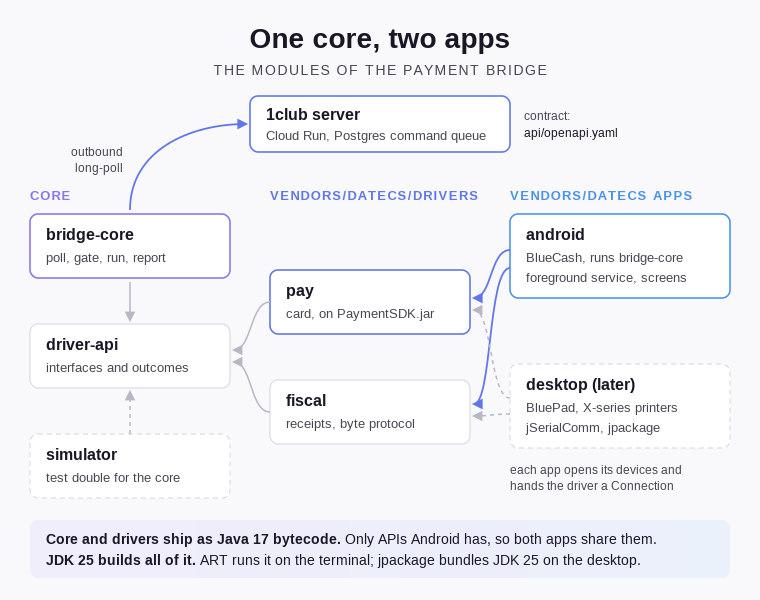
core/ is vendor-neutral. bridge-core talks to 1club and runs the commands,
and it depends on driver-api and nothing else. vendors/datecs/ holds
everything one vendor needs: its two drivers and an app for each kind of
terminal it makes. The drivers never open a device. Each app opens it (through
the BlueCash's system services, or a serial port on the desktop) and hands the
driver a Connection with an input and an output stream, which is why one
Datecs card driver can serve both the BlueCash and the BluePad.
It wasn't laid out like that at first. The first build had a flat
integrations/ folder with datecs-pay and datecs-fiscal in it, plus
app-android and app-desktop at the root. In November I moved it all into
core/ and vendors/datecs/ in one refactor. With one vendor the
flat layout was fine. With a second vendor it would have mixed two vendors'
apps at the root and two vendors' drivers in one folder, and the split makes a
second vendor a new folder next to datecs/ that the core never imports. Each
app now lists the devices it runs in one place, BlueCashDevices and
BluePadDevices.
The build is a Gradle multi-project in the Kotlin DSL with a version catalog,
and four convention plugins in build-logic/ (shared library, serialization,
Android app, desktop app) so a module's own build file is a few lines. The
foojay resolver downloads JDK 25 on a machine that doesn't have it, and CI is
one GitHub Actions job that runs ./gradlew build on Temurin 25. ktlint runs
in the build. I switched it to the IntelliJ style early, because the official
one wanted braces and blank lines around every when branch.
A good part of the repository is written for whoever works on it next, including agents:
AGENTS.mdlists the money-safety invariants (ambiguity isunknown, no card before the gate,rejectedmeans never accepted, one command per device and so on) and ends that list with "A reviewer rejects code that weakens one."design.mdholds the architecture, the driver interface, both flows, the contract and the stack, with the reason for each choice.docs/integrations/datecs.mdis the only place vendor facts go, including a dated table of what the real hardware did.docs/vendors-ref/holds Datecs' SDK distributions exactly as they shipped. It's git-ignored, because the files are under the Datecs EULA. The rules for using it are inAGENTS.md. The API comes from the binaries (javapon the jar, since the bundled Javadoc can be older), behaviour comes from the demo source, and protocol details come from the PDFs. A file the build needs is copied into the module'slibs/and never referenced from there.
The coupling with 1club is one file, api/openapi.yaml. Early on I asked
whether we'd have to publish the bridge as a package for the 1club monorepo.
We don't. Our access-control bridge has an npm SDK because 1club calls it, so
1club needs client code. Here the bridge calls 1club, so 1club only serves the
routes and validates what comes in with zod, against a byte-for-byte copy of
the contract kept on its side.
Milestone by milestone
With the documents settled, the code went quickly. M1 (the Gradle skeleton,
driver-api and the OpenAPI contract), M2 (the core and the simulator), M3
(both Datecs drivers) and M4 (the Android app) followed one after another.
The brief for M5, the server side, went to a separate session in the
1club repository, and it came back as a pull request there.
Each milestone ended with a summary and a stop, so I could read it before the next one started. Those summaries are where the design got corrected. Building the core changed the contract in three places:
Integration.open(connection)lost its config parameter. The device's id needs the serial number from the device, so the id can't exist before the device is open.- The poll got a
version. As designed, it returned every open command, including the one being run, so it would have answered at once on every call, in a loop. openChargesstopped counting queued charges. As first defined it counted the charge waiting to run, so end of day could never run before a charge.
All three were in a design I'd reviewed several times, and none of them showed up until there was code running against it.
M2 ended with 50 tests and M3 with 84. The core's tests run every money rule
against a fake 1club server in virtual time, so "no 200 on accepted for 30
minutes means no charge" takes milliseconds. The card driver's tests run the
real Datecs SDK against a fake pinpad that speaks its byte format, and that
format was worked out from the jar's bytecode. The fiscal driver checks its framing byte for byte against
the worked example in the protocol manual.
M3 also turned up the best find of the lot. While I was reviewing it there was
a stray debug_log.txt in the card driver's folder, full of the fake pinpad's
traffic. The SDK's debug mode is on by default, and it appends every raw frame
to that file in the working directory. On a real terminal that file would
hold card traffic. The driver now calls Pinpad.setDebug(false) before it
opens a pinpad, and a test checks that no file gets written.
On the bench
Nothing touched real hardware until November. Then the findings came quickly:
- The simulated mode failed on the BlueCash (the
nullInputStreamabove). I removed it from the app altogether, so the app always drives the real devices and the simulator is a test double only. - The fiscal module wanted its diagnostic-info command in a tab-separated syntax the first driver didn't use.
- A paper interruption in the middle of a receipt left it open. The module answered the close with success and kept the receipt open anyway, so the driver now confirms every close and settles receipts it finds open.
- The card reader stopped answering after sitting idle. The bridge reopens a reader that doesn't answer before it charges, and keeps idle readers answering, so a sale never waits for one to wake up.
- A fiscal operator's password can be checked with a command that prints nothing (command 101), so 1club checks one when it's set and doesn't waste paper on it. Each check runs once and never again, restarts included, because the device locks an operator out after a few wrong passwords.
The long-poll went from 25 seconds to 60 along the way, and a host decline now shows BORICA's own text.
The terminal is a product too
The first Android app had three screens, pairing, status and device checks. It was a tool for whoever set the terminal up. Then it turned into something a customer looks at.
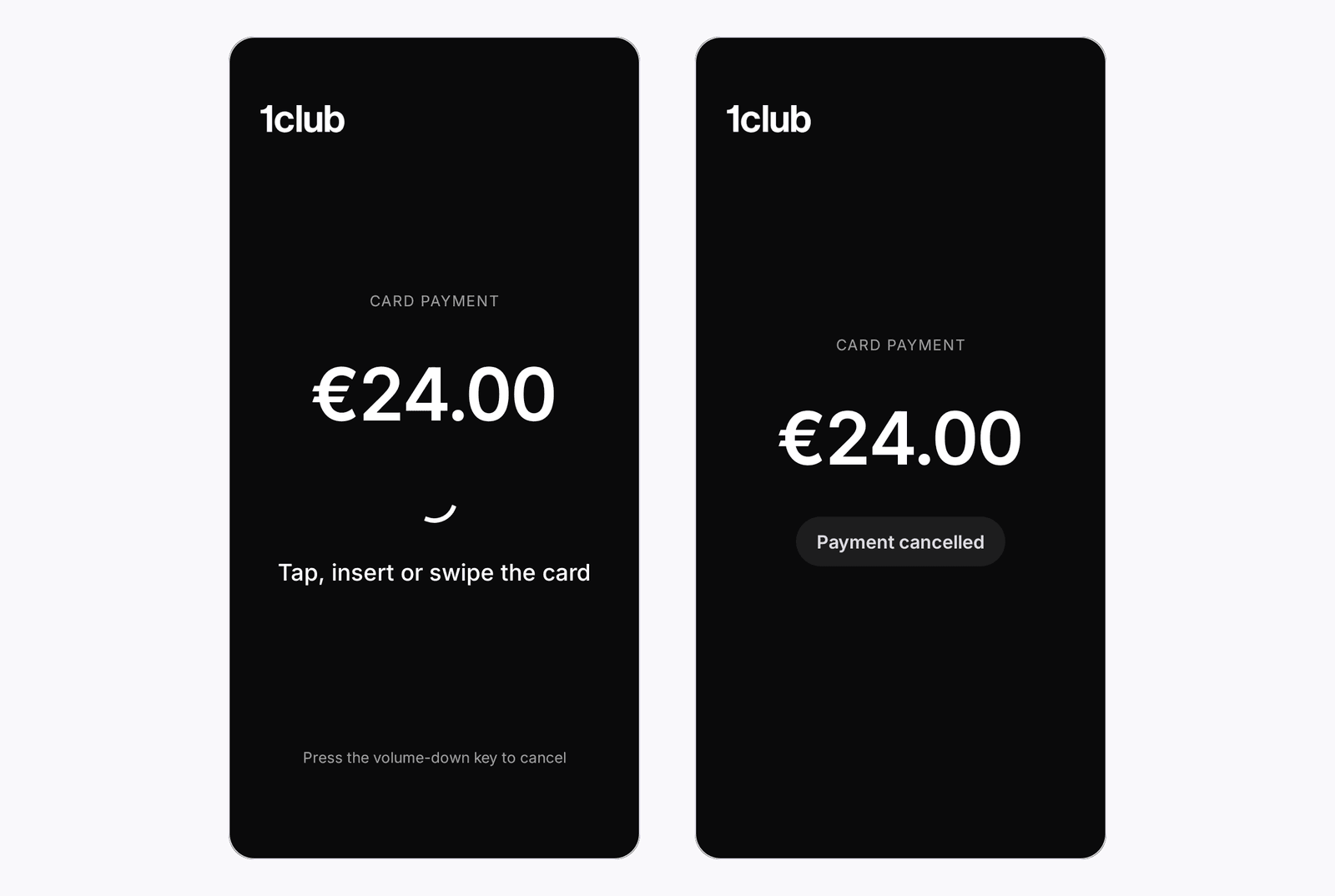
A charge now opens a payment screen with the amount and the reader's own prompts. Cancel is the volume-down key, and a cancel from the till in 1club stops a charge that's already waiting for a card. A charge wakes a sleeping screen. After an app update the bridge restarts by itself, so nobody has to reopen it on each terminal. And between payments the terminal shows Active mode, a branded screen that keeps the display on, says it's ready for card payments, and carries a QR code for the member app. You hold it to get out, and the app lands on it at launch and after pairing.
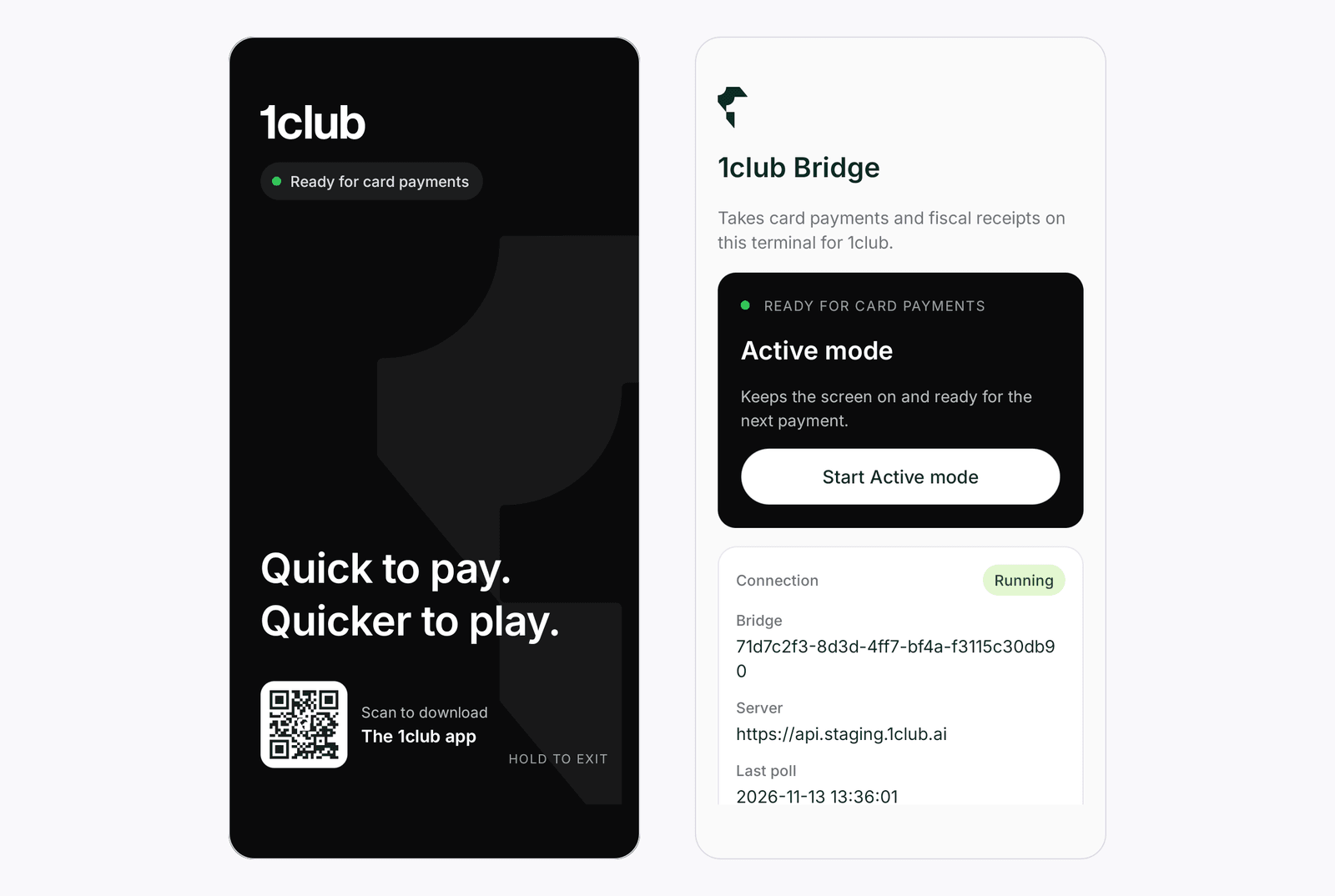
The payment screen has to come up over whatever else is on the terminal, and for that Android wants the "display over other apps" permission. It isn't granted at install, so for now someone switches it on in Settings on each terminal. That's one of the questions I sent Datecs.
Into the Datecs Store
When it was time for the store, I asked for the file Datecs would need. There was no
requirements document anywhere I could find at first, so the first submission
was a release build of 0.5.0, signed with our own key, a page of technical
information and a short email in Bulgarian with questions. Gmail won't attach
an .apk, so the files went up to Drive.
Datecs' answer settled the process. They sign the app, send it back for us to confirm everything works, and then publish it. For the first version they wanted the data described in their requirements file, and every later version needs only the new APK. The requirements came with an appendix that every Android app on a certified Datecs terminal has to meet. It's derived from PCI DSS and asks, among other things, that the app can't capture sensitive input, that the PIN is entered only on certified hardware, that card data is protected while it's processed and stored, that it can't be copied, screenshotted, shared or printed, and that it's encrypted in transit.
I went through it point by point against the code. Most of it held because card data never enters the app at all. The certified reader reads the card, takes the PIN and talks to BORICA. The app sends it an amount and a 1club reference and gets back the result and receipt-grade references (masked PAN, scheme, RRN, authorisation code, STAN, terminal ID). The pairing is sealed with an AES-256-GCM key in the Android Keystore, backups are off, and plain HTTP is blocked in release builds.
Two things didn't hold. No screen blocked screenshots. And the device checks screen, a bench tool, showed masked PANs as selectable text and let anyone holding the terminal run end of day or a 0.01 charge by hand. Neither is a breach on paper (PCI allows a masked PAN on screen), but a reviewer would have flagged both, and the second one I just didn't want on a club's counter.
Both were fixed in 1.0.0. Every window gets FLAG_SECURE in a release build,
and it's applied from the application, before any screen is built, so a new
screen can't forget it:
private object SecureScreens : Application.ActivityLifecycleCallbacks {
    override fun onActivityPreCreated(activity: Activity, savedInstanceState: Bundle?) =
        activity.window.secure()
    // the other callbacks do nothing
}

internal fun Window.secure() {
    if (!BuildConfig.DEBUG) addFlags(WindowManager.LayoutParams.FLAG_SECURE)
}
A dialog is a window of its own, so the one confirmation dialog calls
secure() too. The device checks screen moved into the src/debug source
set, along with its manifest entry. A release APK doesn't contain the class at
all, and the button that opens it only exists in debug builds and names the
screen by a string.
The screenshots for the store raised the obvious problem. If the app blocks screenshots, it can't be screenshotted for the store listing. They were taken on the bench BlueCash with the 1.0.0 debug build, paired with staging, with a €24 sale rung up in the staging Point of Sale and cancelled with the volume-down key. Then I took a screenshot myself with the terminal's key combination and asked why that still worked. It was the debug build, of course. A release build can't be installed over a debug one because they're signed differently, so checking the block on the terminal waits until Datecs sends their signed copy back.
The reply to Datecs carries the 1.0.0 APK, a 96×96 icon cut from the launcher icon, the four screenshots, a note about the screenshot and device-checks fix, and the declaration they asked for.
Where it stands
One point of the appendix is still open, and it's Datecs' to answer. The
reader has no network of its own, so the Datecs SDK inside our app carries its
connection to BORICA. Whether that traffic is encrypted end to end depends on
the reader's TLS mode, a setting Datecs configures (tag DF3C). The SDK opens
its socket with a default SSLContext and doesn't check the host name, so we
asked them to confirm the reader runs its own TLS.
When the signed APK comes back, the debug build comes off the bench terminal,
theirs goes on, it gets paired again, and then a staging sale goes through end
to end with a cancel, and a screenshot attempt on every screen. No club has
the app yet. The desktop app for the BluePad, M7, hasn't been started. The
repository is about 9,300 lines of Kotlin today, a third of them tests, and
./gradlew build runs 150 of them.